Passing Parameters values from Jenkins to Selenium C#
Passing some parameters like Browsers and url from Jenkins Job to C# or any other code allows to do a lot of stuff and manipulation to make your Automation successful.
Step 1: Click on Configure of your job,
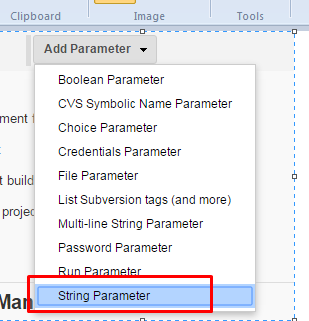
Step 2 : Click on the CheckBox and add a Parameter

Step 3: Add a String Parameter as shown below
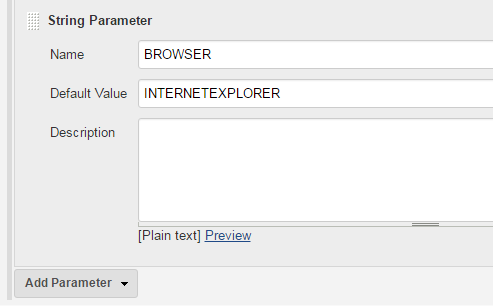
Step 4: Add a value in the Parameter called “BROWSER”
Step 5 : Get the PARAMETER in the C# code as shown below
//Getting the BROWSER parameter from the Jekins Job
ExecutionBrowser = System.Environment.GetEnvironmentVariable("BROWSER");
                switch (ExecutionBrowser)
                {
                    case "CHROME":
                        Browser = new ChromeDriver();
                        break;

                    case "INTERNETEXPLORER":
                        var options = new InternetExplorerOptions()
                        {
                            //InitialBrowserUrl = baseURL,
                            IntroduceInstabilityByIgnoringProtectedModeSettings = true,
                            IgnoreZoomLevel = true,
                            EnableNativeEvents = false
                        };
                        Browser = new InternetExplorerDriver(options);
                        break;

                    case "FIREFOX":
                        Browser= new FirefoxDriver();
                        break;

                    default:
                        Browser = new ChromeDriver();
                        break;

                }