MouseHover and Click in Selenium using C#
The below post will illustrate how to do a mousehover over the element and then click on the submenu or link that’s displayed on hover over the first element
Step 1 : Do a MouseHover and then display SubMenus
Step 2: Go a SubMenu page that’s displayed on MouseHover
Example
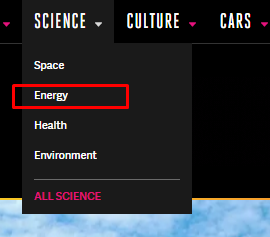
To click on Energy on the SubMenu, I may have to do a MouseHover on “Science” and then Click on the link Energy.
For that all I have to use this code
 public void MouseHover_SubMenuClick(string PrimaryMenu, string SubMenu)
 {
           //Doing a MouseHover
            WebDriverWait wait = new WebDriverWait(Driver, TimeSpan.FromSeconds(10));
            var element = wait.Until(ExpectedConditions.ElementIsVisible(By.XPath(PrimaryMenu)));
            Actions action = new Actions(Driver);
            action.MoveToElement(element).Perform();
            //Clicking the SubMenu on MouseHover
            var menuelement = Browser.FindElement(By.XPath(SubMenu), LongLongWaitTime);
            menuelement.Click();
  }
In the above code
- First I do a mousehover on the element say PrimaryMenu “Science”
- Then Click on the submenu “Energy” that is displayed